(365) 226-10-97 buxdpi@buxdpi.uz 2 Piridastgir Street, Bukhara City
shape
shape

Padlet: A Collaborative Digital Wall for Interactive Teaching and Learning

Padlet: A Collaborative Digital Wall for Interactive Teaching and Learning

Padlet: A Collaborative Digital Wall for Interactive Teaching and Learning

In today's rapidly evolving educational landscape, collaboration, creativity, and digital communication have become essential components of effective teaching and learning. Modern classrooms increasingly rely on technology that encourages active participation, teamwork, and knowledge sharing. One of the most popular platforms designed to support collaborative learning is Padlet.

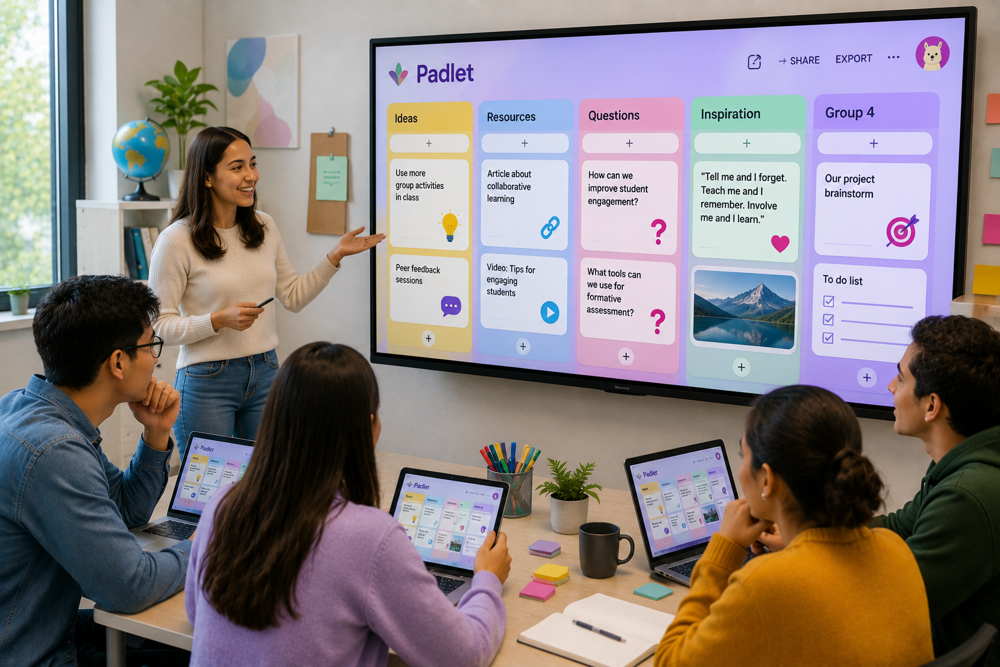
Padlet is a cloud-based digital collaboration platform that allows teachers, students, and organizations to create interactive virtual boards where users can share ideas, documents, images, videos, audio recordings, links, and other multimedia content. Its intuitive interface and flexible design make it suitable for classrooms, online education, project-based learning, brainstorming sessions, and professional development.

For students and future educators of the Bukhara State Pedagogical Institute, mastering Padlet provides valuable opportunities to develop digital collaboration skills, improve communication, and implement innovative teaching methods in modern educational environments.


1. What Is Padlet?

Padlet is an online collaboration platform that functions as a virtual bulletin board or digital wall where multiple users can contribute content in real time.

Users can post:

  • text notes;

  • images;

  • videos;

  • audio recordings;

  • PDF documents;

  • presentations;

  • website links;

  • maps;

  • YouTube videos;

  • various multimedia files.

Since Padlet is cloud-based, all updates are synchronized instantly and can be accessed from anywhere with an internet connection.


2. Key Features of Padlet

Padlet provides numerous features that simplify collaborative learning.

Its major features include:

  • drag-and-drop content creation;

  • real-time collaboration;

  • multimedia support;

  • customizable board layouts;

  • cloud storage;

  • commenting system;

  • reactions and voting;

  • mobile accessibility;

  • privacy and permission controls;

  • easy sharing through links or QR codes.

These features allow educators to create interactive learning spaces without technical complexity.


3. Benefits for Teachers

Padlet offers teachers a flexible environment for organizing educational activities.

Educators can:

  • create collaborative lesson boards;

  • collect homework assignments;

  • organize brainstorming sessions;

  • facilitate classroom discussions;

  • share learning resources;

  • manage project-based learning;

  • encourage student participation.

Teachers can monitor student contributions and provide feedback efficiently.


4. Benefits for Students

Students can use Padlet to:

  • collaborate on group projects;

  • share ideas creatively;

  • build digital portfolios;

  • exchange educational resources;

  • submit assignments;

  • communicate with classmates;

  • develop teamwork and communication skills.

These activities foster active learning and increase student engagement.


5. Padlet and Collaborative Learning

Collaboration is one of the core strengths of Padlet.

The platform supports:

  • simultaneous editing;

  • discussion threads;

  • comments and feedback;

  • reactions such as likes or ratings;

  • file sharing;

  • collaborative brainstorming;

  • project management.

These capabilities make Padlet an excellent tool for implementing Collaborative Learning and Project-Based Learning (PBL) methodologies.


6. Supporting Online and Blended Learning

Padlet works effectively across multiple instructional formats, including:

  • face-to-face classrooms;

  • online learning;

  • blended learning;

  • flipped classrooms;

  • teacher professional development;

  • independent student learning.

Because all materials are stored online, learners can access them anytime and from virtually any device.


7. Artificial Intelligence and Padlet

Padlet continues to integrate artificial intelligence into its platform to improve productivity and creativity.

AI-powered features can assist users by:

  • generating ideas;

  • summarizing text;

  • organizing information;

  • supporting lesson planning;

  • improving written content;

  • encouraging creative thinking.

Although AI tools can accelerate content creation, educators should always review AI-generated materials to ensure their accuracy, reliability, and educational appropriateness.


8. Best Practices for Using Padlet

To maximize educational value, teachers should:

  • define clear objectives for each board;

  • organize information logically;

  • provide clear participation instructions;

  • encourage meaningful discussions;

  • integrate multimedia resources;

  • moderate student contributions when necessary;

  • summarize key learning outcomes after activities.

These practices help create productive and engaging collaborative learning environments.


9. Limitations of Padlet

Despite its many strengths, Padlet has several limitations.

These include:

  • dependence on reliable internet access;

  • limited number of boards in the free version;

  • premium features require a subscription;

  • large collaborative projects may require careful organization.

Nevertheless, Padlet remains one of the most versatile collaboration platforms available for education.


10. Why Should Future Teachers Learn Padlet?

Digital collaboration has become an essential component of modern education.

Learning Padlet enables future educators to:

  • organize interactive lessons;

  • encourage teamwork;

  • increase student engagement;

  • improve communication;

  • develop digital teaching competencies;

  • integrate collaborative learning strategies into classroom practice.

These abilities are increasingly valued in schools, colleges, and universities worldwide.


Conclusion

Padlet has become one of the world's leading collaborative learning platforms by providing educators and students with a simple yet powerful digital workspace for sharing ideas, organizing projects, and promoting active participation. Its real-time collaboration features, multimedia support, flexible board layouts, and cloud-based accessibility make it an excellent tool for both traditional and online learning environments. Students and future educators of the Bukhara State Pedagogical Institute who master Padlet will be well prepared to foster collaboration, encourage creativity, and build engaging digital learning communities that meet the demands of 21st-century education.

SEO Keywords: Padlet, Padlet for education, collaborative learning, virtual bulletin board, digital classroom, educational technology, online collaboration, project-based learning, Bukhara State Pedagogical Institute, digital pedagogy.