(365) 226-10-97 buxdpi@buxdpi.uz 2 Piridastgir Street, Bukhara City
shape
shape

Working with GitHub: A Complete Guide to Version Control and Collaborative Software Development

  • Home
  • IT va dasturlash
  • Working with GitHub: A Complete Guide to Version Control and Collaborative Software Development
Working with GitHub: A Complete Guide to Version Control and Collaborative Software Development

Working with GitHub: A Complete Guide to Version Control and Collaborative Software Development

Working with GitHub: A Complete Guide to Version Control and Collaborative Software Development

In today's software development industry, effective collaboration and efficient code management are essential for building reliable applications. Whether developing a small personal project or contributing to a large enterprise system, developers need tools that allow them to track changes, collaborate with teammates, and maintain high-quality code. This is where Git and GitHub play a critical role.

GitHub has become the world's leading platform for hosting source code and managing software development projects. Millions of developers, startups, universities, and technology companies use GitHub every day to collaborate, share knowledge, automate workflows, and contribute to open-source software.

For students and educators at the Bukhara State Pedagogical Institute, mastering GitHub is an essential step toward becoming a professional software developer. It enables students to build practical experience, collaborate on real-world projects, and create an impressive portfolio for future employers.


1. What Are Git and GitHub?

Many beginners assume Git and GitHub are the same, but they serve different purposes.

Git

Git is a distributed Version Control System (VCS) designed to track changes in source code during software development.

Git enables developers to:

  • record project history;

  • manage multiple versions of code;

  • restore previous versions;

  • collaborate without overwriting each other's work;

  • resolve code conflicts efficiently.

Git works locally on your computer and does not require an internet connection for most operations.

GitHub

GitHub is a cloud-based platform that hosts Git repositories and provides collaboration tools for software development teams.

GitHub offers features such as:

  • online repository hosting;

  • collaboration between developers;

  • Pull Requests;

  • Issues management;

  • GitHub Actions for automation;

  • project documentation;

  • code review tools.

Together, Git and GitHub form the foundation of modern software development workflows.


2. Why Is GitHub Important?

GitHub has become an industry standard because it improves both individual productivity and team collaboration.

Key advantages include:

  • secure cloud storage for source code;

  • complete version history;

  • efficient collaboration among developers;

  • participation in Open Source projects;

  • professional portfolio development;

  • integration with modern development tools.

Many technology companies review applicants' GitHub profiles when evaluating programming skills.


3. Understanding Repositories

A repository, often called a repo, is a storage location that contains a project's files and complete development history.

A typical repository includes:

  • source code;

  • configuration files;

  • documentation;

  • README.md;

  • LICENSE;

  • test files;

  • project assets.

Repositories can be public or private depending on project requirements.


4. Essential GitHub Concepts

Understanding GitHub terminology is essential for productive collaboration.

Commit

A snapshot of changes saved to the project history.

Branch

An independent line of development that allows developers to work on new features without affecting the main codebase.

Merge

The process of combining changes from one branch into another.

Pull Request

A request to review and merge code changes into the main branch.

Clone

Creating a local copy of a remote repository.

Fork

Making a personal copy of another developer's repository under your own GitHub account.

These concepts form the foundation of collaborative software development.


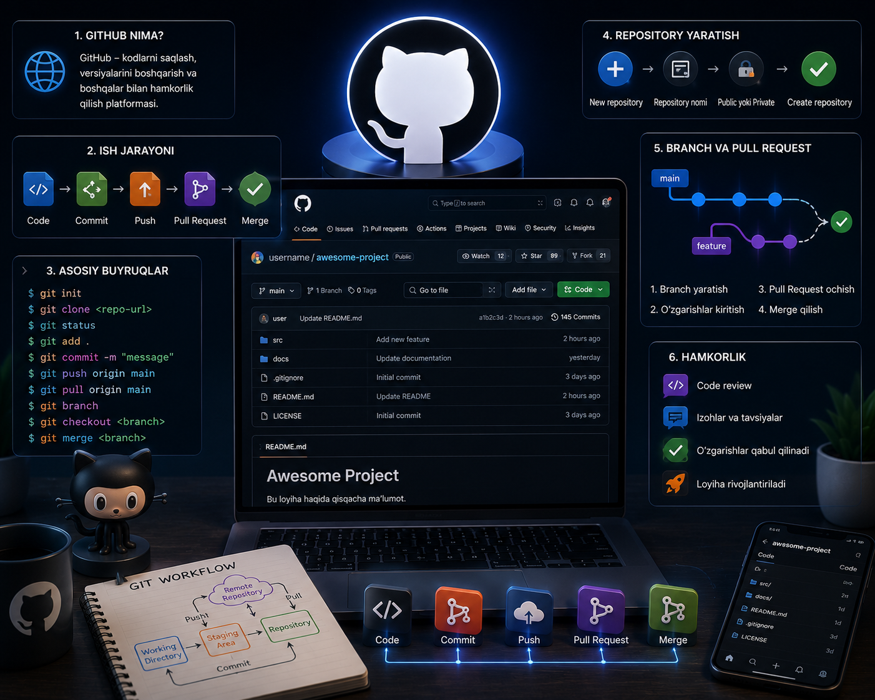
5. Typical GitHub Workflow

Professional software teams commonly follow this workflow:

  1. Create a repository.

  2. Clone the repository locally.

  3. Create a new feature branch.

  4. Write and test code.

  5. Commit changes.

  6. Push changes to GitHub.

  7. Open a Pull Request.

  8. Perform code review.

  9. Merge approved changes.

  10. Deploy the updated application.

Following this workflow helps maintain code quality and project stability.


6. Common Git Commands

Developers frequently use the following Git commands:

git init
git clone
git status
git add
git commit
git push
git pull
git fetch
git branch
git checkout
git switch
git merge
git rebase
git log

Learning these commands provides a solid foundation for working with Git and GitHub.


7. Team Collaboration with GitHub

GitHub offers numerous collaboration features that simplify software development.

Popular collaboration tools include:

  • Pull Requests;

  • Code Reviews;

  • Issues;

  • Discussions;

  • Projects;

  • Wiki;

  • Labels;

  • Milestones.

These features improve communication, organize tasks, and ensure higher software quality.


8. What Is GitHub Actions?

GitHub Actions is GitHub's built-in automation platform.

It allows developers to automate:

  • software testing;

  • Continuous Integration (CI);

  • Continuous Deployment (CD);

  • Docker image creation;

  • application deployment;

  • code quality analysis;

  • security scanning.

Automation reduces manual work and improves software reliability.


9. How to Learn GitHub

Beginners can follow a structured learning path.

Recommended steps include:

  1. Learn Git fundamentals.

  2. Create a GitHub account.

  3. Build your first repository.

  4. Learn Markdown and README documentation.

  5. Practice using branches.

  6. Create Pull Requests.

  7. Contribute to Open Source projects.

  8. Build a professional portfolio.

  9. Explore GitHub Actions.

  10. Collaborate with other developers.

Regular practice is the most effective way to become proficient with GitHub.


10. The Future of GitHub

GitHub continues to evolve alongside advances in Artificial Intelligence and cloud computing.

Important future trends include:

  • AI-powered programming assistants;

  • GitHub Copilot integration;

  • intelligent code reviews;

  • automated security analysis;

  • cloud-based development environments;

  • DevOps and CI/CD automation;

  • improved collaboration features;

  • expanded Open Source ecosystems.

As software development becomes increasingly collaborative and automated, GitHub will continue to play a central role in the technology industry.


Conclusion

GitHub is much more than a platform for storing code. It is a comprehensive ecosystem that supports version control, collaborative development, project management, automation, and open-source innovation. Learning Git and GitHub has become an essential skill for modern software developers. For students and educators of the Bukhara State Pedagogical Institute, mastering GitHub provides opportunities to participate in global software projects, develop practical programming experience, build an impressive professional portfolio, and prepare for successful careers in the rapidly growing technology industry.

SEO Keywords: GitHub, working with GitHub, Git tutorial, GitHub guide, Version Control System, Git repository, Git branch, Git commit, Pull Request, GitHub Actions, CI/CD, Open Source, collaborative software development, software engineering, GitHub portfolio, Bukhara State Pedagogical Institute.